技术文档有英文版本。代码和字段名称遵循当前的 Mod API。
模组制作文档
Mod assets: dimensions, templates and attachment rules
General guide · JSON field reference · Template directory
The Mod API loads mod-owned PNG images used by resources, placeables, creatures and world features. It also accepts particle polygons registered in Java and a separate mod-manager cover image. Audio, fonts, terrain packs, shaders and UI skins do not currently have public loading hooks. The supplied image templates focus on resources and placeables.
Supported asset formats
| Asset | Size / layout | JSON binding | Supplied template |
|---|---|---|---|
| Resource standalone icon | Use 64 × 64 for consistency; standalone paths are not cell-indexed | resources.spritePath |
resource-icon-64.svg |
| Resource atlas | Exactly 64 × 64 per addressed cell; template is 256 × 64 | spriteSheetPath, zero-based spriteSheetColumn and spriteSheetRow |
resource-atlas-64.svg |
| Crafted placeable inventory icon | Same 64 × 64 cell contract | Nested craftedResource.spriteSheet* fields |
Same resource templates |
| Placeable atlas | Explicit crop size; template is four 128 × 128 cells in a 512 × 128 image | spriteAtlasPath and facingSprites |
placeable-four-facing-128.svg |
| Placeable foreground layer | Match the main atlas dimensions and crop coordinates | foregroundSpriteAtlasPath |
placeable-foreground-128.svg |
| Alternate or variant placeable frame | Extra crop in the same atlas; no implicit spacing | Nested alternateFrame or variantFrames |
Extend the placeable atlas and declare each crop |
| Particle shape | 3-16 convex polygon vertices in −1…1 | Java shape registration → profile shapeId |
StarterMod.java |

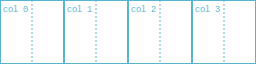
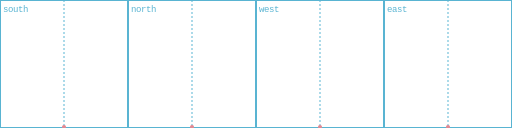
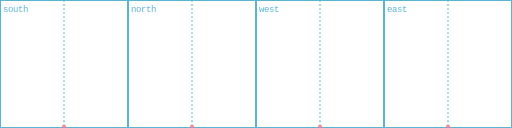
The PNG resource layout guide and placeable layout guide are also included as visual references. Use the explicit cardinal mapping here for new art; a guide's decorative marks are not engine metadata.
Creatures and world features
Creature visuals binds PNG paths for the existing animation states and declares frame counts
and columns per bank. Eight-direction sheets use rows south, south-west, west, north-west,
north, north-east, east, south-east, with frames left-to-right. Copy a compatible creature's
visual definition before replacing its sheets, and keep frame/bank dimensions consistent with
that actor renderer. A new image does not create a new animation state or attachment convention.
World-feature sprite arrays accept ordinary PNG paths or
sheet:assets/mods/your_mod/plants.png#column,row,size. This selects a square cell of size pixels,
using zero-based column and row indices. The validator checks the entire cell fits. Explicit
seasonal, depleted, dead and stump sprite arrays can reuse the same sheet.
Put gameplay art under pack/assets/; reference it as assets/mods/your_mod/.... Put a promotional
mod-manager image at pack/about/preview.png instead. The latter is not runtime art and is excluded
from save identity. See covers and descriptions for limits and localization.
The SVG files are editable authoring guides, not finished game artwork. Draw in the artwork
group, hide or remove the guides group, then export the exact canvas as a transparent PNG. Do not
copy SVGs into a runtime pack: the loader rejects them. Do not resize using smooth interpolation.
Keep pixel edges crisp, transparent backgrounds clean, and artwork within its intended cell.
Paths and ownership
Keep your own PNGs under the pack's assets/ directory:
pack/assets/icons/materials.png
pack/assets/placeables/workshop.png
pack/assets/placeables/workshop_front.png
For manifest ID my_mod, JSON uses:
assets/mods/my_mod/icons/materials.png
assets/mods/my_mod/placeables/workshop.png
assets/mods/my_mod/placeables/workshop_front.png
The game resolves that logical namespace to the captured pack. A manifest-relative path like
assets/icons/materials.png is not the same as the namespaced runtime path. Use forward slashes
and preserve filename case. Other mods' asset paths require a dependency on that asset owner.
Existing base-game paths can be referenced directly, as the runnable Practice Workshop does.
Images are checked for readable PNG data, maximum dimension 16,384 pixels and maximum area 64 million pixels, as well as the pack's file-size limits. These are upper bounds, not target sizes. Keep atlases compact. Atlas coordinates must stay inside the image, including every alternate and variant crop.
Resource cells and standalone icons
A resource sheet's cell is found with:
pixel x = spriteSheetColumn × 64
pixel y = spriteSheetRow × 64
For a 256 × 64 sheet, columns 0-3 and row 0 are valid. Column 4 is outside it. The engine selects the full 64-pixel square; it does not trim the icon or infer cells from transparent gaps. Center your visible object within the cell and leave enough empty space for a readable inventory icon.
To switch a copied resource from atlas to a standalone icon, set spritePath to the PNG and clear
its inherited spriteSheetPath to null. For the opposite direction, clear spritePath and provide
the sheet plus both indices. Avoid supplying two competing sources and relying on renderer
precedence. For a resource that also serves as a placeable's UI icon, share its full ID or reference
it with modalIconKey:"resource:my_mod:workshop"; UI consumers can select icons differently.
Four-direction placeables
New four-cell rows are authored south, north, west, east, from left to right:
| Logical facing | x | y | width | height | anchorPixelX | anchorPixelY |
|---|---|---|---|---|---|---|
south |
0 | 0 | 128 | 128 | 64 | 127 |
north |
128 | 0 | 128 | 128 | 64 | 127 |
west |
256 | 0 | 128 | 128 | 64 | 127 |
east |
384 | 0 | 128 | 128 | 64 | 127 |
The bottom-center anchor is the supplied template convention; use a different anchor if your artwork requires it. Anchors are measured inside the crop, not from the atlas origin. They align the sprite with its world location; they do not define its footprint or work positions.
The complete atlas-patch.json binds every facing explicitly and preserves the starter workshop's worker positions. To use it:
- Export your resource PNG to
pack/assets/icons/materials.pngand placeable PNG topack/assets/placeables/workshop.pngwith the dimensions above. - Copy
atlas-patch.jsonintopack/data/atlas-patch.json. - Append
data/atlas-patch.jsontomod.json'spatchesarray after the original definitions. - Build into a new output folder and validate before opening a new test world.
The atlas example is intentionally outside the loaded starter: it requires your exported artwork. It has no dependency on a missing PNG in the default runnable pack. For another mod ID, rename both the operation IDs and all namespaced asset paths.
For a single-facing object, declare only a south region and use an appropriate footprint/access
design. For legacy base sheets, retain their explicit physical mapping when copying: not all old
four-cell rows used the modern direction order. Never compensate for a different footprint by
swapping west and east in the renderer.
Footprints, occupancy and access
footprintWidth, footprintDepth, heightBlocks and occupiedHeightBlocks describe logical
world occupancy. They are not derived from the crop's dimensions. A 128-pixel image can represent
a one-tile object or a wider piece of furniture with a different authored footprint.
Use occupiedOffsets, blockingOffsets and placementClearanceOffsets for explicit tile-space
shapes where needed. Their {x,y} entries can be negative. Work slots likewise use tile-space
standOffset and faceOffset. Do not multiply these values by 64 or 128. These lists are
per-facing metadata; keep them consistent with the actual approach side in every rotation.
A worker slot contributes to crafting capacity; a recipient slot supplies a service position.
Both need unobstructed access. Inspect all four facings in game, including wall placement and
neighboring furniture. Validation catches bounds and reference errors, but cannot tell whether
your drawn bench faces its worker or whether an intended room layout remains usable.
Alternate frames, variants and foreground
Alternate and variant frames use {x,y,width,height,anchorPixelX,anchorPixelY} regions in the same
main atlas. Each region is explicit; adding more cells does not auto-detect an animation.
The game selects these frames only through behavior that already uses them. The Mod API has no custom
frame timing, looping sequence or sprite-state event hook.
For an existing foreground-layer behavior, export a second PNG on the same canvas and put only
foreground pixels in the matching cells. Use foregroundSpriteAtlasPath; the existing renderer
uses the same region coordinates. A foreground file is not a separate placeable and does not
provide a new collision shape. Test actor overlap in game before distributing it.
Particle silhouettes and trails
A particle is a registered polygon, not another resource-atlas cell. The starter diamond uses
(1,0), (0,0.5), (-1,0), (0,-0.5). A triangle or another convex 3-16-vertex silhouette can be
registered in the same way. Vertices must be finite, inside −1…1, counterclockwise in mathematical
coordinates and contain the origin strictly inside. Keep the final vertex distinct from the first.
Use particleProfiles for the bounded lifetime, travel distance, radius, trail count and brightness.
Use essences.weaponGlow for 1-3 colors, a particle count and the profile reference. No external
image or texture is required. A profile can also be selected by an equipment-transform station.
The game already decides which weapon/offhand pixels emit and which views display the effect. The API cannot add those attachment pixels to a new character sheet, hook every world object as an emitter, install a shader or attach arbitrary combat particles. Those asset and behavior hooks would need a separate engine capability.